HTB Sizzle

做个windows靶机

信息收集

1
2
3
4
5
6
7
8
9
10
11
12
13
14
15
16
17
18
19
20
21
22
23
24
25
26
27
28
29
30
31
32
33
34
35
36
37
38
39
40
41
42
43
44
45
46
47
48
49
50
51
52
53
54
55
56
57
58
59
60
61
62
63
64
65
66
67
┌──(kali㉿kali)-[~]
└─$ nmap -sV -sT -sC -o nmapinitial 10.10.10.103
Starting Nmap 7.92 ( https://nmap.org ) at 2022-08-08 00:57 EDT
Nmap scan report for 10.10.10.103
Host is up (0.29s latency).
Not shown: 976 filtered tcp ports (no-response), 11 filtered tcp ports (host-unreach)
PORT STATE SERVICE VERSION
21/tcp open ftp Microsoft ftpd
|_ftp-bounce: bounce working!
|_ftp-anon: Anonymous FTP login allowed (FTP code 230)
| ftp-syst:
|_ SYST: Windows_NT
53/tcp open domain Simple DNS Plus
80/tcp open http Microsoft IIS httpd 10.0
|_http-server-header: Microsoft-IIS/10.0
| http-methods:
|_ Potentially risky methods: TRACE
|_http-title: Site doesn't have a title (text/html).
135/tcp open msrpc Microsoft Windows RPC
139/tcp open netbios-ssn Microsoft Windows netbios-ssn
389/tcp open ldap Microsoft Windows Active Directory LDAP (Domain: HTB.LOCAL, Site: Default-First-Site-Name)
| ssl-cert: Subject: commonName=sizzle.htb.local
| Not valid before: 2018-07-03T17:58:55
|_Not valid after: 2020-07-02T17:58:55
|_ssl-date: 2022-08-08T05:03:56+00:00; -1s from scanner time.
443/tcp open ssl/http Microsoft IIS httpd 10.0
|_http-title: Site doesn't have a title (text/html).
| ssl-cert: Subject: commonName=sizzle.htb.local
| Not valid before: 2018-07-03T17:58:55
|_Not valid after: 2020-07-02T17:58:55
|_ssl-date: 2022-08-08T05:03:54+00:00; -1s from scanner time.
| tls-alpn:
| h2
|_ http/1.1
|_http-server-header: Microsoft-IIS/10.0
445/tcp open microsoft-ds?
464/tcp open kpasswd5?
593/tcp open ncacn_http Microsoft Windows RPC over HTTP 1.0
636/tcp open ssl/ldap Microsoft Windows Active Directory LDAP (Domain: HTB.LOCAL, Site: Default-First-Site-Name)
| ssl-cert: Subject: commonName=sizzle.htb.local
| Not valid before: 2018-07-03T17:58:55
|_Not valid after: 2020-07-02T17:58:55
|_ssl-date: 2022-08-08T05:03:54+00:00; -1s from scanner time.
3268/tcp open ldap Microsoft Windows Active Directory LDAP (Domain: HTB.LOCAL, Site: Default-First-Site-Name)
|_ssl-date: 2022-08-08T05:03:54+00:00; -1s from scanner time.
| ssl-cert: Subject: commonName=sizzle.htb.local
| Not valid before: 2018-07-03T17:58:55
|_Not valid after: 2020-07-02T17:58:55
3269/tcp open ssl/ldap Microsoft Windows Active Directory LDAP (Domain: HTB.LOCAL, Site: Default-First-Site-Name)
|_ssl-date: 2022-08-08T05:03:53+00:00; -1s from scanner time.
| ssl-cert: Subject: commonName=sizzle.htb.local
| Not valid before: 2018-07-03T17:58:55
|_Not valid after: 2020-07-02T17:58:55
Service Info: Host: SIZZLE; OS: Windows; CPE: cpe:/o:microsoft:windows

Host script results:
| smb2-time:
| date: 2022-08-08T05:03:10
|_ start_date: 2022-08-08T04:55:46
|_clock-skew: mean: -1s, deviation: 0s, median: -1s
| smb2-security-mode:
| 3.1.1:
|_ Message signing enabled and required

Service detection performed. Please report any incorrect results at https://nmap.org/submit/ .
Nmap done: 1 IP address (1 host up) scanned in 422.88 seconds

可以看到 21 端口有一个任意登陆

端口测试

HTTP 80

按照惯例扫一下目录

1
gobuster dir -u http://10.10.10.103/ -w /usr/share/wordlists/dirb/common.txt -t 100 
1
2
3
4
5
6
/aspnet_client        (Status: 301) [Size: 157] [--> http://10.10.10.103/aspnet_client/]
/certenroll (Status: 301) [Size: 154] [--> http://10.10.10.103/certenroll/]
/certsrv (Status: 401) [Size: 1293]
/Images (Status: 301) [Size: 150] [--> http://10.10.10.103/Images/]
/images (Status: 301) [Size: 150] [--> http://10.10.10.103/images/]
/index.html (Status: 200) [Size: 60]

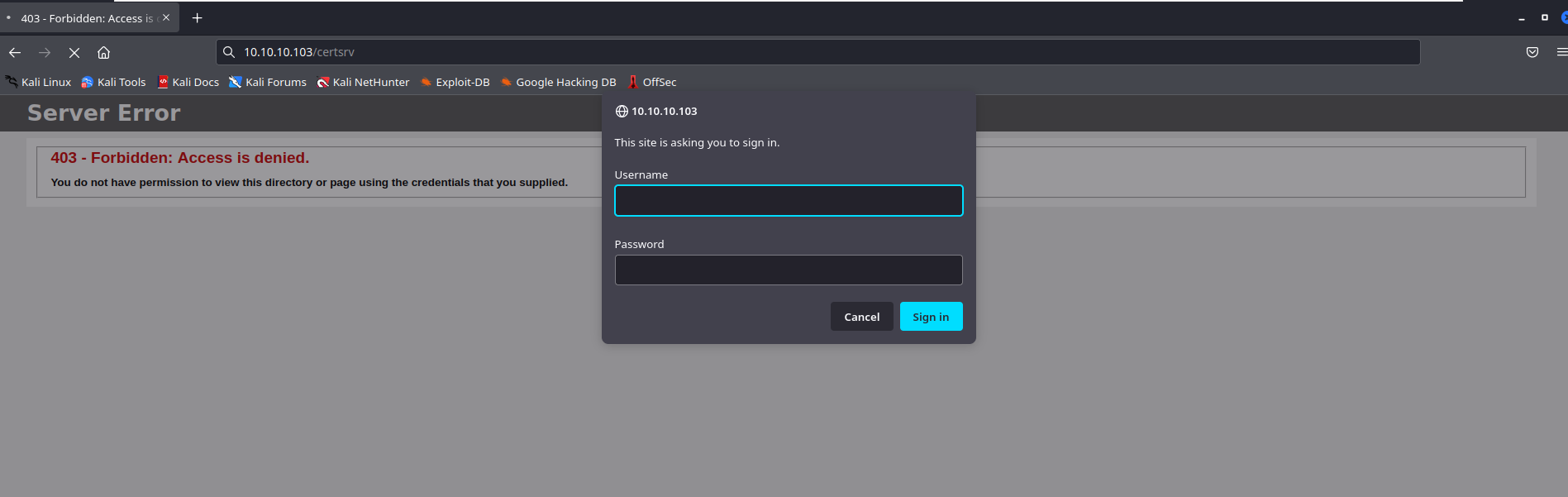
certsrv 这里需要进行登录(感觉后面肯定要用到 关键是想办法拿他的password

image-20220816025755079

1
2
/aspnet_client        (Status: 301) [Size: 157] [--> http://10.10.10.103/aspnet_client/]
/certenroll (Status: 301) [Size: 154] [--> http://10.10.10.103/certenroll/]

这两个都 403 了

FTP 21/tcp

ftp咋打?

1
2
3
4
5
6
7
8
9
10
11
12
13
┌──(kali㉿kali)-[~]
└─$ ftp 10.10.10.103
Connected to 10.10.10.103.
220 Microsoft FTP Service
Name (10.10.10.103:kali): anonymous
331 Anonymous access allowed, send identity (e-mail name) as password.
Password:
230 User logged in.
Remote system type is Windows_NT.
ftp> dir
229 Entering Extended Passive Mode (|||62993|)
125 Data connection already open; Transfer starting.
226 Transfer complete.

以前还真没搞过 直接 Name:anonymous 然后不用输入密码就可以登录

但好像是空的

LDAP 389/tcp

这块也没遇到过 ( 我真的好小白啊啊啊

一、LDAP简介

LDAP(Lightweight Directory Access Protocol)是轻量级目录访问协议。以信息目录的形式存在,在该目录中可只定义一次用户和组,而在多台机器和多个应用程序间共享它们。LDAP与数据库最大区别在于,数据库以“表格-字段-值”的形是来存储数据,而LDAP以树状形方式访问存储在LDAP目录中的信息。

二、LDAP目录结构

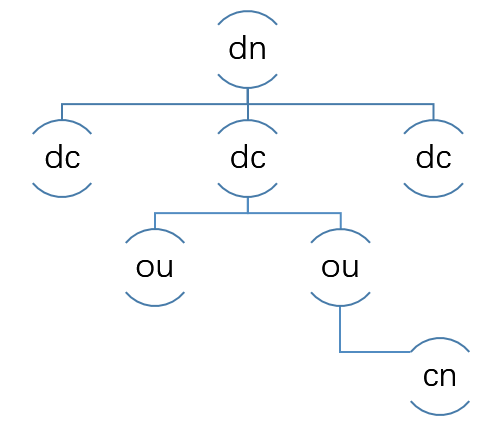
LDAP目录以树状的层次结构来存储数据。其结果如下图所示:

QQ截图20181119154533.png

dn标志一条记录,描述一条数据的详细路径(比如:人、组织、IP地址等)

dc表示一条记录所属区域,相当于数据库(比如:中国、美国、韩国等)

ou表示一条记录所属组织(比如:省份、部门、行业等)

cn表示一条记录的名字,相当于数据库中的主键即需要查找的目标

三、LDAP注入

LDAP具有特定的查询结构,并具有特定的语法,来对特定目录进行遍历,LDAP注入攻击和SQL注入攻击类似,利用用户引入的参数生成LDAP查询,由于部分参数没有适当的过滤,因此攻击者可以注入恶意代码以造城恶意攻击。其常见操作符有=(等于)、(逻辑和)、|(逻辑或)、(逻辑否)、*(通配符)。

SMB 445/tcp

内网渗透之SMB的利用 - FreeBuf网络安全行业门户

利用SCF文件攻击进行渗透实战 - FreeBuf网络安全行业门户

渗透测试中SMB服务漏洞检查checklist - 腾讯云开发者社区-腾讯云 (tencent.com)

一、什么是SMB协议:

SMB(全称是Server Message Block)是一个协议服务器信息块,它是一种客户机/服务器、请求/响应协议,通过SMB协议可以在计算机间共享文件、打印机、命名管道等资源,电脑上的网上邻居就是靠SMB实现的;SMB协议工作在应用层和会话层,可以用在TCP/IP协议之上,SMB使用TCP139端口和TCP445端口

内网渗透中smb服务(139,445端口)的利用方式

二、SMB的利用方式

1
2
3
┌──(kali㉿kali)-[~]
└─$ smbmap -H 10.10.10.103
[+] IP: 10.10.10.103:445 Name: 10.10.10.103

好像没啥用

1.通过NTLM认证进行SMB攻击

LM和NTLM都是windows中对密码进行hash加密的两种不同的方式。只不过个人系统在windows vista后,服务器在windows server2003之后都采用ntlm hash的方式。使用mimikatz抓取到ntlm hash.

漏洞利用思路:

(1)首先需要生成一个.scf的恶意文件(SCF文件是”WINDOWS资源管理器命令”文件,它也是一种可执行文件);

(2)上传恶意文件让受害者试图访问我们的共享文件,这时responder会作出反应:其提供给我NTLM哈希并且访问资源responder就受到受害者的hash

2.SMB会话共享加爆破

1
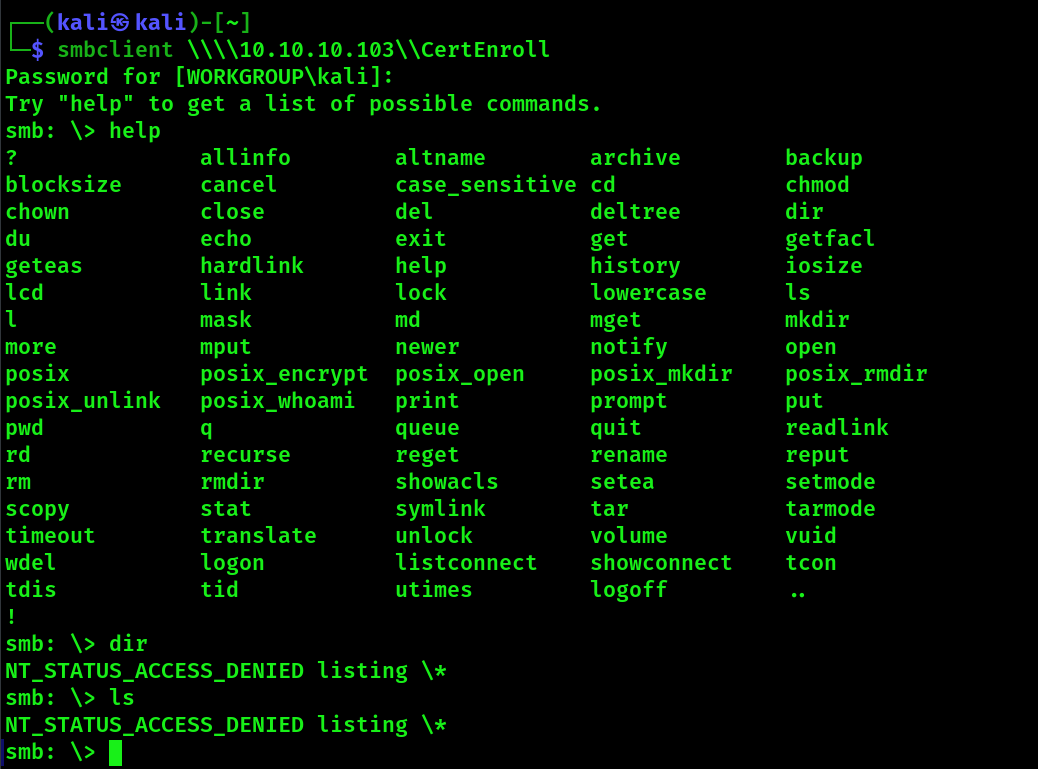
使用smb枚举列出共享的文件: smbclient -L \\xx.xx.xx.xx

实践一下

smbclient -L \\10.10.10.103

1
2
3
4
5
6
7
8
9
10
11
12
13
14
15
16
$ smbclient -L \\10.10.10.103
Password for [WORKGROUP\kali]:

Sharename Type Comment
--------- ---- -------
ADMIN$ Disk Remote Admin
C$ Disk Default share
CertEnroll Disk Active Directory Certificate Services share
Department Shares Disk
IPC$ IPC Remote IPC
NETLOGON Disk Logon server share
Operations Disk
SYSVOL Disk Logon server share
Reconnecting with SMB1 for workgroup listing.
do_connect: Connection to 10.10.10.103 failed (Error NT_STATUS_RESOURCE_NAME_NOT_FOUND)
Unable to connect with SMB1 -- no workgroup available
1
使用smb枚举列出共享的文件: smbclient -L \\xx.xx.xx.xx
image-20220808144129131

咱也不知道这有没有连上去 反正密码我空着了 。。。

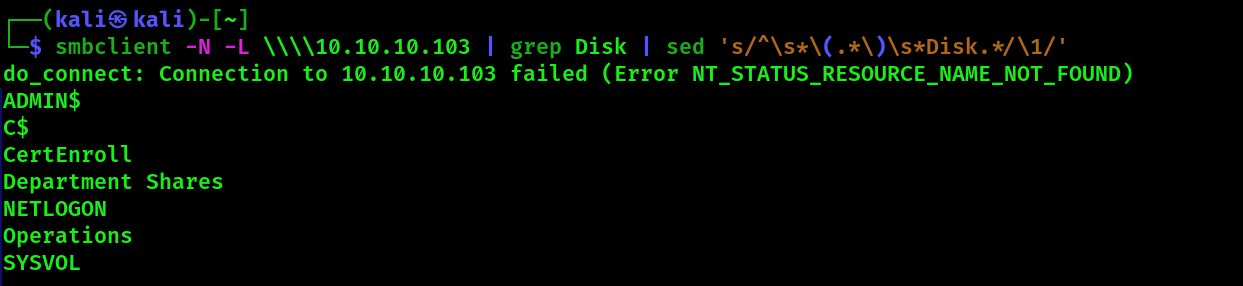
看了眼 国外大哥的wp

不得不称赞一句 nb!

首先一个网站 regex101: build, test, and debug regex

image-20220808150417942

真的是佩服这老哥 这老哥对linux命令行玩的是真的明白

1
2
3
4
5
6
7
8
9
10
11
12
13
14
15
16
17
18
19
20
21
22
23
24
25
26
27
28
29
30
31
32
33
34
35
36
37
38
39
40
41
42
43
44
45
┌──(kali㉿kali)-[~]
└─$ smbclient -N -L \\\\10.10.10.103 | grep Disk | sed 's/^\s*\(.*\)\s*Disk.*/\1/' | while read share; do echo "======${share}======"; smbclient -N "//10.10.10.103/${share}" -c dir; echo; done
do_connect: Connection to 10.10.10.103 failed (Error NT_STATUS_RESOURCE_NAME_NOT_FOUND)
======ADMIN$======
tree connect failed: NT_STATUS_ACCESS_DENIED

======C$======
tree connect failed: NT_STATUS_ACCESS_DENIED

======CertEnroll======
NT_STATUS_ACCESS_DENIED listing \*

======Department Shares======
. D 0 Tue Jul 3 11:22:32 2018
.. D 0 Tue Jul 3 11:22:32 2018
Accounting D 0 Mon Jul 2 15:21:43 2018
Audit D 0 Mon Jul 2 15:14:28 2018
Banking D 0 Tue Jul 3 11:22:39 2018
CEO_protected D 0 Mon Jul 2 15:15:01 2018
Devops D 0 Mon Jul 2 15:19:33 2018
Finance D 0 Mon Jul 2 15:11:57 2018
HR D 0 Mon Jul 2 15:16:11 2018
Infosec D 0 Mon Jul 2 15:14:24 2018
Infrastructure D 0 Mon Jul 2 15:13:59 2018
IT D 0 Mon Jul 2 15:12:04 2018
Legal D 0 Mon Jul 2 15:12:09 2018
M&A D 0 Mon Jul 2 15:15:25 2018
Marketing D 0 Mon Jul 2 15:14:43 2018
R&D D 0 Mon Jul 2 15:11:47 2018
Sales D 0 Mon Jul 2 15:14:37 2018
Security D 0 Mon Jul 2 15:21:47 2018
Tax D 0 Mon Jul 2 15:16:54 2018
Users D 0 Tue Jul 10 17:39:32 2018
ZZ_ARCHIVE D 0 Mon Jul 2 15:32:58 2018

7779839 blocks of size 4096. 3590132 blocks available

======NETLOGON======
NT_STATUS_ACCESS_DENIED listing \*

======Operations======
NT_STATUS_ACCESS_DENIED listing \*

======SYSVOL======
NT_STATUS_ACCESS_DENIED listing \*

可以看出 只有这个 Department Shares 管用

Mount Share

又是一个骚操作 使用挂载使我们可以更方便地访问 帅的一批

1
2
3
4
5
6
7
8
9
10
11
12
                                                                                                                 ┌──(root㉿kali)-[/home/kali]
└─# mount -t cifs "//10.10.10.103/Department Shares" /mnt

Password for root@//10.10.10.103/Department Shares:

┌──(root㉿kali)-[/home/kali]
└─# cd /mnt

┌──(root㉿kali)-[/mnt]
└─# ls
Accounting Banking Devops HR Infrastructure Legal Marketing Sales Tax ZZ_ARCHIVE
Audit CEO_protected Finance Infosec IT 'M&A' 'R&D' Security Users

这时候有个技巧 如何快速递归查看文件 可以用tree 指令 发现只有一个文件夹里有东西

1
2
3
4
5
6
7
8
9
10
11
12
13
14
15
16
17
18
19
20
21
22
23
24
25
26
27
28
29
30
31
32
33
34
35
36
37
38
39
40
41
42
43
44
45
46
47
48
49
50
51
52
53
54
55
56
57
58
59
60
61
62
63
64
65
66
67
68
69
70
71
72
73
74
75
76
77
78
79
80
81
82
83
84
85
86
87
88
89
90
91
92
93
94
95
96
97
98
99
100
101
102
103
104
105
┌──(root㉿kali)-[/mnt]
└─# tree
.
├── Accounting
├── Audit
├── Banking
│   └── Offshore
│   ├── Clients
│   ├── Data
│   ├── Dev
│   ├── Plans
│   └── Sites
├── CEO_protected
├── Devops
├── Finance
├── HR
│   ├── Benefits
│   ├── Corporate Events
│   ├── New Hire Documents
│   ├── Payroll
│   └── Policies
├── Infosec
├── Infrastructure
├── IT
├── Legal
├── M&A
├── Marketing
├── R&D
├── Sales
├── Security
├── Tax
│   ├── 2010
│   ├── 2011
│   ├── 2012
│   ├── 2013
│   ├── 2014
│   ├── 2015
│   ├── 2016
│   ├── 2017
│   └── 2018
├── Users
│   ├── amanda
│   ├── amanda_adm
│   ├── bill
│   ├── bob
│   ├── chris
│   ├── henry
│   ├── joe
│   ├── jose
│   ├── lkys37en
│   ├── morgan
│   ├── mrb3n
│   └── Public
└── ZZ_ARCHIVE
├── AddComplete.pptx
├── AddMerge.ram
├── ConfirmUnprotect.doc
├── ConvertFromInvoke.mov
├── ConvertJoin.docx
├── CopyPublish.ogg
├── DebugMove.mpg
├── DebugSelect.mpg
├── DebugUse.pptx
├── DisconnectApprove.ogg
├── DisconnectDebug.mpeg2
├── EditCompress.xls
├── EditMount.doc
├── EditSuspend.mp3
├── EnableAdd.pptx
├── EnablePing.mov
├── EnableSend.ppt
├── EnterMerge.mpeg
├── ExitEnter.mpg
├── ExportEdit.ogg
├── GetOptimize.pdf
├── GroupSend.rm
├── HideExpand.rm
├── InstallWait.pptx
├── JoinEnable.ram
├── LimitInstall.doc
├── LimitStep.ppt
├── MergeBlock.mp3
├── MountClear.mpeg2
├── MoveUninstall.docx
├── NewInitialize.doc
├── OutConnect.mpeg2
├── PingGet.dot
├── ReceiveInvoke.mpeg2
├── RemoveEnter.mpeg3
├── RemoveRestart.mpeg
├── RequestJoin.mpeg2
├── RequestOpen.ogg
├── ResetCompare.avi
├── ResetUninstall.mpeg
├── ResumeCompare.doc
├── SelectPop.ogg
├── SuspendWatch.mp4
├── SwitchConvertFrom.mpg
├── UndoPing.rm
├── UninstallExpand.mp3
├── UnpublishSplit.ppt
├── UnregisterPing.pptx
├── UpdateRead.mpeg
├── WaitRevoke.pptx
└── WriteUninstall.mp3

然后对应的 Users 文件夹里给出了一些名字 可能会有用

Check for Write

看看这些文件夹能不能写

又是一个小技巧

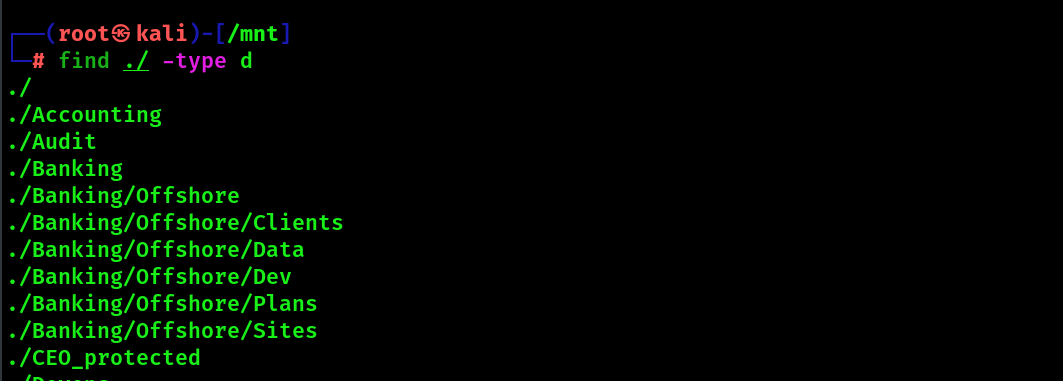
find ./ -type d will list all the directories in the current directory.

image-20220816032050331 So for each directory, I’ll try to write a file in it. If that returns true (it writes), I’ll echo the dir name and then remove the file. I’ll do that same again but this time making a directory. I find two dirs I can write in:
1
2
3
4
find . -type d | while read directory; do 
touch ${directory}/0xdf 2>/dev/null && echo "${directory} - write file" && rm ${directory}/0xdf;
mkdir ${directory}/0xdf 2>/dev/null && echo "${directory} - write dir" && rmdir ${directory}/0xdf;
done
1
2
3
4
./Users/Public - write file
./Users/Public - write directory
./ZZ_ARCHIVE - write file
./ZZ_ARCHIVE - write directory

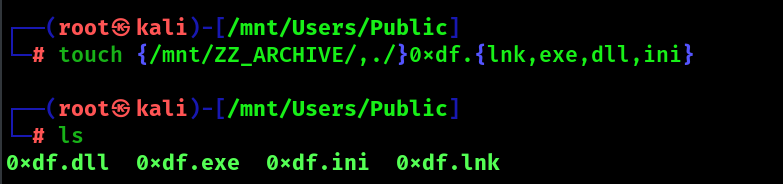
俩文件可写

image-20220816033035600

之后我发现 我写的东西没了

又学了一招

1
watch -d "ls /mnt/Users/Public/*; ls /mnt/ZZ_ARCHIVE/0xdf*"

通过 NTLMv2 |获取信誉0xdf黑客的东西

SMB Share – SCF File Attacks – Penetration Testing Lab (pentestlab.blog)

reference

HTB: Sizzle | 0xdf hacks stuff